

September 18, 2021 VPN test for China will be conducted today for the Chinese version of Windows 10 devices. Some time before StrongVPN Client for Windows 10 version in China has been unable to connect or difficult to connect situation, while StrongVPN Client in Macbook has been kept open situation. Before this Windows 10 test I contacted the official live chat customer service to technical consultation to understand the situation and informed me that I was a customer using the Client version in China. She said she switched the service for me in the background and I let log out of the account and then log back in after connecting and trying Atlanta server and suggested NY-str-jfk302, Seoul-str-icn303, San Francisco-str-sfo309.
The daily speed test will help you understand three things.
1. the success rate of the VPN’s server connection in the device under test.
2. the server connection time of the VPN in the tested device.
3. the speed of the VPN after a successful connection to the server in the device under test.
Please follow the Twitter account to get the latest VPN test notification first: 10Beasts_Barry
StrongVPN Last 6 Test reports: [See More]Checking out multiple test reports can help you understand more effectively how this VPN works in the long run.
- Testing StrongVPN Usability on Windows in China – Feb 11 2025 - It has been almost two months since the last test of StrongVPN on Windows. Today’s task is to test how StrongVPN performs on Windows devices in mainland China, focusing on whether it can successfully connect to the VPN server and the speed performance after the connection. This test report will serve as a reference. Follow the Twitter account @BEAST-NET to receive the latest VPN test notifications as soon as they are available. StrongVPN Recent 6 Testing Reports Overview: [View All]Reviewing multiple test reports can provide you with a more comprehensive understanding of this VPN’s long-term performance. Local testing devices and network ISP: China Telecom ISP Speed: 300Mbps Device: Windows Test Time: Feb 11, 2025 (UTC+8) StrongVPN Test Version: v2.6.6.0 Official Promotion: New users $3.66/month StrongVPN New User $3.66/mo San Francisco – USA: Connection successful; SpeedTest: Download: 1.79 Mbps; Upload: 50.18 Mbps; Ping: 148 ms; Netflix Fast: 24 Kbps. YouTube experience: YouTube video viewing…
- Testing StrongVPN Usability on iPhone in China – Jan 17 2025 - Today, I’ll test how StrongVPN performs on iPhone (IOS) devices in mainland China. hope all users planning to travel to China can read this test report before departure and download and install a VPN on their computers and smartphones in advance. Once inside China, you won’t be able to access websites like Google and YouTube, or even the VPN's official website. Follow the Twitter account @BEAST-NET to receive the latest VPN test notifications as soon as they are available. StrongVPN Recent 6 Testing Reports Overview: [View All]Reviewing multiple test reports can provide you with a more comprehensive understanding of this VPN’s long-term performance. Local testing devices and network ISP: China Telecom ISP Speed: 300Mbps Device: iPhone (iOS) Test Time: Jan 17, 2025 (UTC+8) StrongVPN Test Version: v2.7.0 Official Promotion: New users $3.66/month When I checked the version of StrongVPN, I couldn’t find the version number in the app. So, I…
- Testing StrongVPN Usability on Android in China – Jan 14 2025 - Today, I’ll test how StrongVPN performs on Android devices in mainland China. I will share the results honestly, whether the connection succeeds or fails. Providing users with accurate information is what matters most. Feel free to leave a comment if there’s anything you’d like to discuss. Follow the Twitter account @BEAST-NET to receive the latest VPN test notifications as soon as they are available. StrongVPN Recent 6 Testing Reports Overview: [View All]Reviewing multiple test reports can provide you with a more comprehensive understanding of this VPN’s long-term performance. Local testing devices and network ISP: China Telecom ISP Speed: 500Mbps Device: Android Test Time: Jan 14, 2025 (UTC+8) StrongVPN Test Version: v2.4.4.0 230877 Official Promotion: New users $3.66/month StrongVPN New User $3.66/mo Setting for China Click the gear icon in the top right corner of StrongVPN to open "Settings." Turn off the "Optimize the VPN for China" option under "General Settings."…
- Testing StrongVPN Usability on MacBook in China – Jan 4 2025 - Today, I will be testing StrongVPN on a MacBook in mainland China. I previously tested the Windows version. StrongVPN offers two versions that can be used in China: one is the International version, and the other is called the StrongVPN Client version. Today, I will be testing the International version and will explain the necessary setup steps for using it in China. Follow the Twitter account @BEAST-NET to receive the latest VPN test notifications as soon as they are available. StrongVPN Recent 6 Testing Reports Overview: [View All]Reviewing multiple test reports can provide you with a more comprehensive understanding of this VPN's long-term performance. Local testing devices and network ISP: China Telecom ISP Speed: 500Mbps Device: Macbook Test Time: Jan 4, 2025 (China time) StrongVPN Test Version: v2.4.4 (126629) Official Promotion: New users $3.66/month Setting for China Open the StrongVPN settings, uncheck "Optimize The VPN For China" under "General," then…
- StrongVPN Windows Test in China – Dec 17 2024 - Today, I will test StrongVPN on a Windows device to evaluate its current functionality in China. If you're planning to travel to China and want to access websites or apps like YouTube, Google, WhatsApp, Facebook, ChatGPT, or Instagram, this test report can serve as a helpful reference. Local testing devices and network ISP: China Telecom ISP Speed: 500Mbps Device: Windows Test Time: December 17, 2024 (China time) StrongVPN Test Version: v2.6.5.0 Random server test report The servers will be tested in alphabetical order from A to Z as listed by StrongVPN. This is a blind test, meaning I don’t know beforehand which servers are accessible in China and which are not. Buenos Aires - Argentina: Connection failed; (Error Code: 809) Here is a screenshot showing the connection failure with error code 809. I will not include repeated screenshots in the subsequent tests. Sydney - Australia: Connection failed; (Error Code: 809) Perth -…
- Best 4 VPN in China, OMG, Just only one! - On March 21, 2022, China VPN test will be conducted on a Windows 10 device today. The test VPNs include ExpressVPN, PureVPN, StrongVPN, and AtlasVPN. If there is enough time, we will test others. Each VPN will indicate its App version number, connection protocol and other information at the beginning before the test. As a result, the number of VPNs tested this time is large, so each VPN will usually randomly check 5-10 servers in different regions. If there are officially recommended servers, it will be explained in the test. If you have any questions, you can leave a message (anonymous) to communicate.
Starting Time: Sep 18, 2021, 2:37 PM
Local device and network: Windows10 / 300M China Telecom / WiFi;
Protocol: TCP;
Version: 1.6.5;
Test’s Server: Official recommend;
Windows StrongVPN Client test in China:
USA – Atlanta (301): Success; (Time efficiency: 6s)
Speedtest Ping: 251ms; Download: 13.41Mbps; Upload: 34.96Mbps;
YouTube Connection Speed: 7423Kbps;

Korea – Seoul (303): Success; (Time efficiency: 6s)
Speedtest Ping: 47ms; Download: 109.4Mbps; Upload: 37.48Mbps;
YouTube Connection Speed: 35320Kbps;
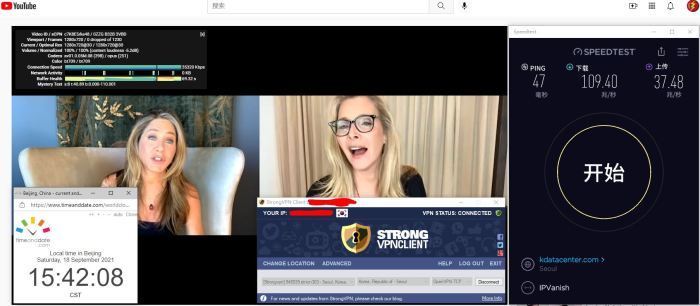

USA – New York (302): Success; (Time efficiency: 7s)
Speedtest Ping: 212ms; Download: 62.33Mbps; Upload: 1.09Mbps;
YouTube Connection Speed: 29074Kbps;


USA – San Francisco (309): Success; (Time efficiency: 9s)
Speedtest Ping: 155ms; Download: 112.01Mbps; Upload: 35.49Mbps;
YouTube Connection Speed: 35741Kbps;

总结: 以上4个服务器时官方技术人员告诉我的可用的服务器,测试了一下确认OK。另外我在客服(客服和技术是两个人)和我交流还告诉我美区的其它一些服务器也是可以使用的,但是我忘记记下来了。影响中只记得San Francisco,大家如果觉得不够用,可以去咨询一下客服,也可以花一些时间测试一下。切换地区及含编号服务器的方法,我写在此文“StrongVPN 无法连接解决方案-实测成功翻墙”的“如何在Windows的StrongVPN Client版本中切换服务器方法”段落中,如果不会切换就自己去看下,如果有问题可以留言交流。
Summary: The above 4 servers are the servers that the official technical staff told me were available, and I tested them to make sure they were OK. In addition, I was told by customer service (customer service and technology are two people) and I also told me that some other servers in the US were available, but I forgot to write them down. I only remember San Francisco in the impact, if you think it is not enough, you can go to consult the customer service, but also spend some time testing. The way to switch regions and numbered servers, I wrote in this article “StrongVPN can not connect solution – tested successfully(zh)” in the “How to switch servers in the StrongVPN Client version of Windows method (zh)”If you don’t know how to switch, you can see for yourself, and if you have questions, you can leave a message.
Windows10 Official Recommend Score: ★ ★ ★ ★